Don't Buy the Omen 34C Until You Read This Full Analysis
The ultrawide monitor market has shifted from a niche luxury for high-end enthusiasts to a competitive landscape where value-oriented models are fighting for desk space. At the center of this transition sits the Omen 34C, a curved ultrawide display that promises an immersive gaming experience without the four-digit price tag often associated with premium panels. However, in the world of display technology, "value" can sometimes be a code word for compromises that aren't immediately apparent on a spec sheet. For potential buyers looking to upgrade their setup, understanding the nuances of VA panel technology, color accuracy for productivity, and the reality of a 165Hz refresh rate on a 34-inch canvas is essential before making the investment.
The Evolution of the Mid-Range Ultrawide
For years, the 34-inch 1440p ultrawide was dominated by expensive IPS (In-Plane Switching) panels known for great colors and viewing angles but often marred by mediocre contrast ratios and "IPS glow." Enter the modern VA (Vertical Alignment) panels used in displays like the Omen 34C. These monitors aim to solve the contrast problem while bringing the price down to a level that challenges traditional 16:9 displays. The Omen 34C represents HP’s attempt to refine this formula, focusing on build quality and a balanced feature set that appeals to both the after-work gamer and the daytime remote professional.
Detailed Product Analysis: Hardware and Design
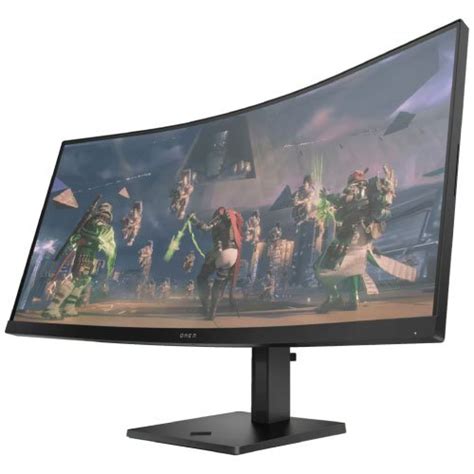
The Omen 34C departs from the aggressive "gamer" aesthetics of the past. There are no jagged edges or excessive RGB lighting strips that scream for attention. Instead, the design is characterized by a clean, matte black finish and a surprisingly slim profile for a monitor of this size. The stand is a heavy, robust piece of hardware with a small footprint, which is a critical consideration for users with smaller desks who don't want a massive tripod-style base taking up room for their keyboard and mouse.
The Curve and Immersion
The monitor features a 1500R curvature. In the world of ultrawides, the "R" value indicates the radius of the circle the curve would form—the lower the number, the more aggressive the curve. A 1500R curve is widely considered the "sweet spot" for 34-inch displays. It provides enough wrap-around to keep the edges of the screen within the user’s peripheral vision, reducing eye strain and increasing immersion in simulation games or cinematic RPGs, without being so aggressive as to distort straight lines in spreadsheet work or architectural software.
Connectivity and Ergonomics
On the back, the Omen 34C offers a standard suite of ports: two HDMI 2.0 ports and one DisplayPort 1.4. While it lacks the HDMI 2.1 standard found in the newest high-end GPUs and consoles, it is more than sufficient for the 1440p resolution and 165Hz refresh rate this monitor supports. Ergonomically, the stand allows for height and tilt adjustment. The absence of a swivel function is a minor drawback, but given the width of an ultrawide, swiveling is rarely a primary requirement for most users.
Display Performance: Beyond the Marketing
The technical heart of the Omen 34C is its WQHD (3440 x 1440) VA panel. To understand if this monitor is right for you, we must look deeper than the 165Hz label.
Contrast and Black Levels
The primary advantage of the VA panel in the Omen 34C is its contrast ratio, typically hovering around 3000:1. This is a massive leap over the 1000:1 ratio found in most IPS competitors. In real-world terms, this means that black looks like black rather than a murky gray. For users who play horror games like Resident Evil or Dead Space, or those who enjoy watching movies in a dimly lit room, the depth and inkiness of the shadows provided by this monitor are its standout features. It creates a sense of three-dimensionality that flatter IPS panels often lack.
The Ghosting Concern
The "Achilles' heel" of VA technology is response time, specifically regarding dark transitions. While the Omen 34C is rated for a 1ms response time (with overdrive), VA panels often exhibit "dark level smearing." This occurs when a fast-moving dark object moves against a lighter background, leaving a faint trail behind it. In competitive fast-paced shooters like Counter-Strike or Valorant, highly sensitive players might notice this. However, for the vast majority of cinematic gaming and general productivity, the smearing on this specific panel is well-controlled and unlikely to be a dealbreaker.
Shop the latest Electronics picks on Amazon.
View Offers →Color Accuracy and Brightness
The Omen 34C claims 99% sRGB color gamut coverage. While it isn't a professional-grade color-grading monitor, the colors are punchy and vibrant. Out of the box, the calibration is decent, though it can lean slightly toward the cooler, bluer side of the spectrum. The peak brightness sits around 350 to 400 nits. This makes it "HDR ready," but it lacks the local dimming zones required for a "true" HDR experience. It is plenty bright for a standard office environment, but it won't provide the eye-searing highlights of a high-end Mini-LED or OLED display.
Comparison of the Omen 34C vs. Market Rivals
When shopping for a 34-inch ultrawide, it's helpful to see where the Omen 34C fits in comparison to common alternatives like entry-level IPS panels and higher-end gaming models.
| Feature | HP Omen 34C | Standard 34" IPS Rival | Budget OLED Ultrawide |
|---|---|---|---|
| Panel Type | VA (Vertical Alignment) | IPS (In-Plane Switching) | QD-OLED / OLED |
| Contrast Ratio | 3000:1 (Deep Blacks) | 1000:1 (Gritter Blacks) | Infinite (True Blacks) |
| Refresh Rate | 165Hz | 144Hz - 160Hz | 175Hz - 240Hz |
| Color Accuracy | Good (99% sRGB) | Excellent (Better Angles) | Superior (Wide Gamut) |
| Price Bracket | Mid-Range / Value | Mid-Range | Premium / High-End |
Pros and Cons: The Balanced View
Buying a monitor is always a game of trade-offs. Here is a breakdown of where the Omen 34C shines and where it stumbles.
- Pro: Exceptional Contrast – The high contrast ratio makes gaming and media consumption incredibly atmospheric compared to standard IPS monitors.
- Pro: Build Quality – The chassis feels premium, the stand is stable, and the overall design fits into any professional or gaming environment.
- Pro: Price-to-Performance Ratio – It offers a high refresh rate and a large, curved canvas at a price point that is accessible for many users.
- Pro: Simple OSD and Software – The Omen Gaming Hub allows for easy adjustments of settings without fiddling with awkward buttons on the back of the screen.
- Con: Black Smearing – Like most VA panels, there is some ghosting in dark scenes during high-speed motion.
- Con: Viewing Angles – If you aren't sitting directly in front of the monitor, you may notice some color shifting at the edges due to the panel technology.
- Con: Limited HDR Impact – While it can accept an HDR signal, the lack of local dimming means you won't get professional-level high dynamic range performance.
The Productivity Factor: An Ultrawide for Work
Most buyers of the Omen 34C aren't just gaming; they are also using it for a 9-to-5 job. The 3440 x 1440 resolution provides approximately 30% more horizontal screen real estate than a standard 1080p monitor. In practical terms, this allows you to have two full-sized browser windows or documents side-by-side without them feeling cramped. For video editing or timeline-based work, the extra width is a transformative experience, allowing you to see much more of your project at once.
The built-in speakers are a "nice-to-have" addition, but they are relatively basic. They are sufficient for system sounds or the occasional video call, but any serious listener will still want to use dedicated speakers or a headset. One missing feature that productivity users might lament is the lack of a USB-C Hub with power delivery. Many modern laptops use a single cable for display and charging; with the Omen 34C, you will still need to plug in your laptop's power adapter and a separate DisplayPort or HDMI cable.
Buying Guide: Is the Omen 34C Right for You?
Before you commit to the Omen 34C, consider these three specific user profiles to see where you align.
1. The Cinematic Gamer
If you primarily play single-player epics, RPGs, or simulation games (like Starfield, Cyberpunk 2077, or Microsoft Flight Simulator), this monitor is an excellent choice. The deep blacks and the immersive curve enhance the "world-feel" of these titles significantly more than a flat IPS panel would.
2. The Hybrid Home-Office User
If you need a monitor that can handle spreadsheets during the day and gaming at night, the Omen 34C is a solid middle-ground. Its aesthetic isn't embarrassing for professional meetings, and the screen size is a major productivity booster. Just be aware of the viewing angle limitations if you share your screen with a colleague sitting next to you.
Shop the latest Electronics picks on Amazon.
Shop Amazon →3. The Competitive E-Sports Player
If your primary goal is to rank up in Apex Legends or Call of Duty, you might want to look elsewhere. The slight response time lag inherent in VA panels can be a disadvantage in high-stakes competitive play. In this case, a 240Hz 1080p or 1440p IPS monitor would likely serve your reflexes better than this ultrawide.
Common Misconceptions About 1440p Ultrawide
A common question from buyers is whether their computer can actually run this monitor. It’s important to remember that 3440 x 1440 is nearly 5 million pixels. While it isn't as demanding as 4K (8 million pixels), it requires significantly more GPU power than standard 1080p. To make use of the 165Hz refresh rate in modern AAA games, a mid-to-high-range graphics card is recommended. If you are running an older budget card, you may find yourself needing to lower settings to maintain a smooth experience on this high-resolution canvas.
Another point of confusion is "Screen Tearing." The Omen 34C supports AMD FreeSync Premium. This technology synchronizes the monitor's refresh rate with your GPU's frame rate output. This eliminates the "tearing" effect where parts of the screen look misaligned during fast motion. It works with both AMD and NVIDIA cards (via G-Sync compatibility), ensuring a smooth visual experience across a wide range of hardware.
The Verdict: A Strong Value Proposition
The HP Omen 34C isn't trying to be the best monitor in the world; it is trying to be the best monitor for a specific price bracket. It succeeds by nailing the fundamentals: contrast, build quality, and a refresh rate that feels incredibly smooth for most users. It avoids the cheap feel and wobbly stands that plague many other budget-friendly ultrawides.
The decision to go with a VA panel was a calculated one. While it introduces the risk of minor motion smearing, it rewards the user with a depth of image and a richness of color that many people find more pleasing for general use than the "washed-out" blacks of traditional IPS screens. If you understand these panel characteristics and your primary focus is on immersion and multitasking rather than e-sports-grade speed, the Omen 34C is one of the most compelling options in the current electronics landscape.
Conclusion
In the final analysis, the Omen 34C is a testament to how far display technology has come. It brings the luxury of a curved ultrawide 165Hz experience down to a level that makes sense for the average consumer. As long as you aren't expecting professional-grade HDR or the instantaneous response times of a $1,000 OLED, this monitor offers a massive upgrade over standard widescreen displays. It is a workhorse for the day and an atmospheric window into digital worlds at night, making it a highly recommended piece of hardware for those ready to make the jump to the ultrawide format.